PUT — Update an Existing Resource
When you send a PUT request to a specific resource ID that already exists, the server treats it as an update operation. The resource is replaced with the new payload, and the system automatically updates its metadata and history.
In this example, you update the existing Patient/1234 by adding a telecom element.
PUT http://localhost/fhir/acme/Patient/1234
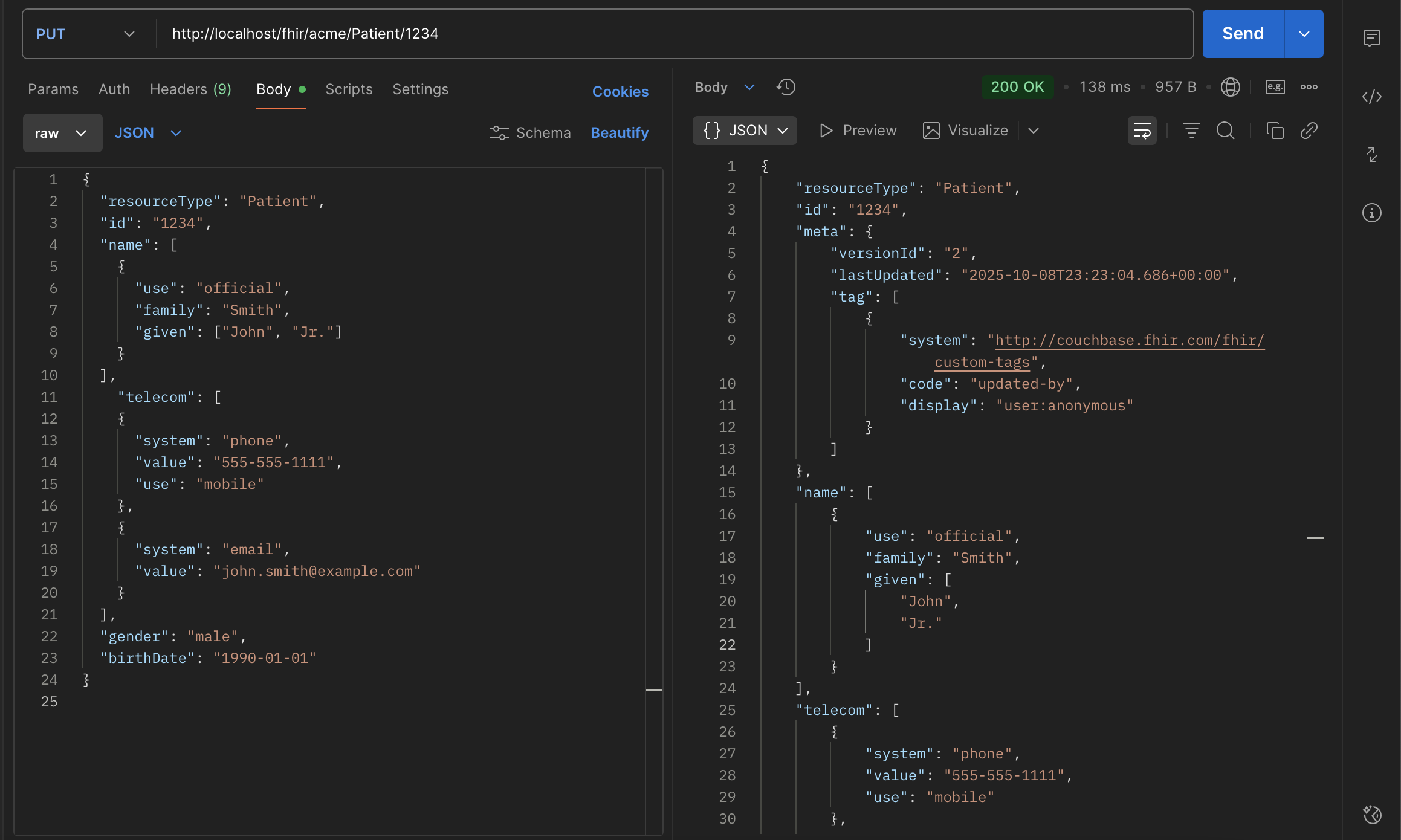
The server responds with:
- HTTP 200 OK — indicating an update (not a new create)
An updated resource where:
- versionId increments (from "1" → "2")
- lastUpdated reflects the new timestamp
- tag changes to updated-by
- The payload includes the new telecom array
How the Update Works Internally
Every PUT is wrapped in a transaction to ensure consistency and preserve history:
Begin transaction
  Check existence of Patient/1234 in the Patient collection
    Found → this is an update
    *Versioning & history*
    Copy the current version of Patient/1234 into the Versions collection
    Increment meta.versionId (e.g., "1" → "2")
  Apply update
    Replace the existing document in Patient collection with the new payload
  Update meta.lastUpdated
  Add audit tag:
  {
    "system": "http://couchbase.fhir.com/fhir/custom-tags",
    "code": "updated-by",
    "display": "user:anonymous"
  }
Commit transaction
This ensures:
- Previous versions are preserved (for _history and vread)
- Updates are atomic
- The active resource always represents the latest version
metadata recap
| Field | Meaning |
|---|---|
versionId | Incremented with every PUT update |
lastUpdated | Timestamp of the latest modification |
tag | Audit trail: created-by on first insert, updated-by on later changes |
profile | Added automatically if bucket is configured with a profile (e.g. US Core) |
Data in Couchbase
| Collection | Contents |
|---|---|
| Resources.Patient | Latest version of Patient/1234 |
| Resources.Versions | Archived prior versions for history retrieval |
| Resources.Tombstones | Only used for soft deletes |
Validation
As with POST, the server validates the incoming payload if validation is enabled:
- Strict → reject if invalid
- Lenient → accept but log warnings
- Disabled → skip validation entirely
FHIR Semantics
- PUT is idempotent: repeating the same request yields the same final state.
- The entire resource is replaced — omitted fields are removed.
- Use PATCH if you only need partial updates.
Summary
- PUT to an existing ID → update
- Server increments versionId and updates metadata
- Previous version stored in Versions
- Response: 200 OK + latest resource
- Fully compliant with FHIR R4 RESTful rules