PUT — Create or Update a Resource (by ID)
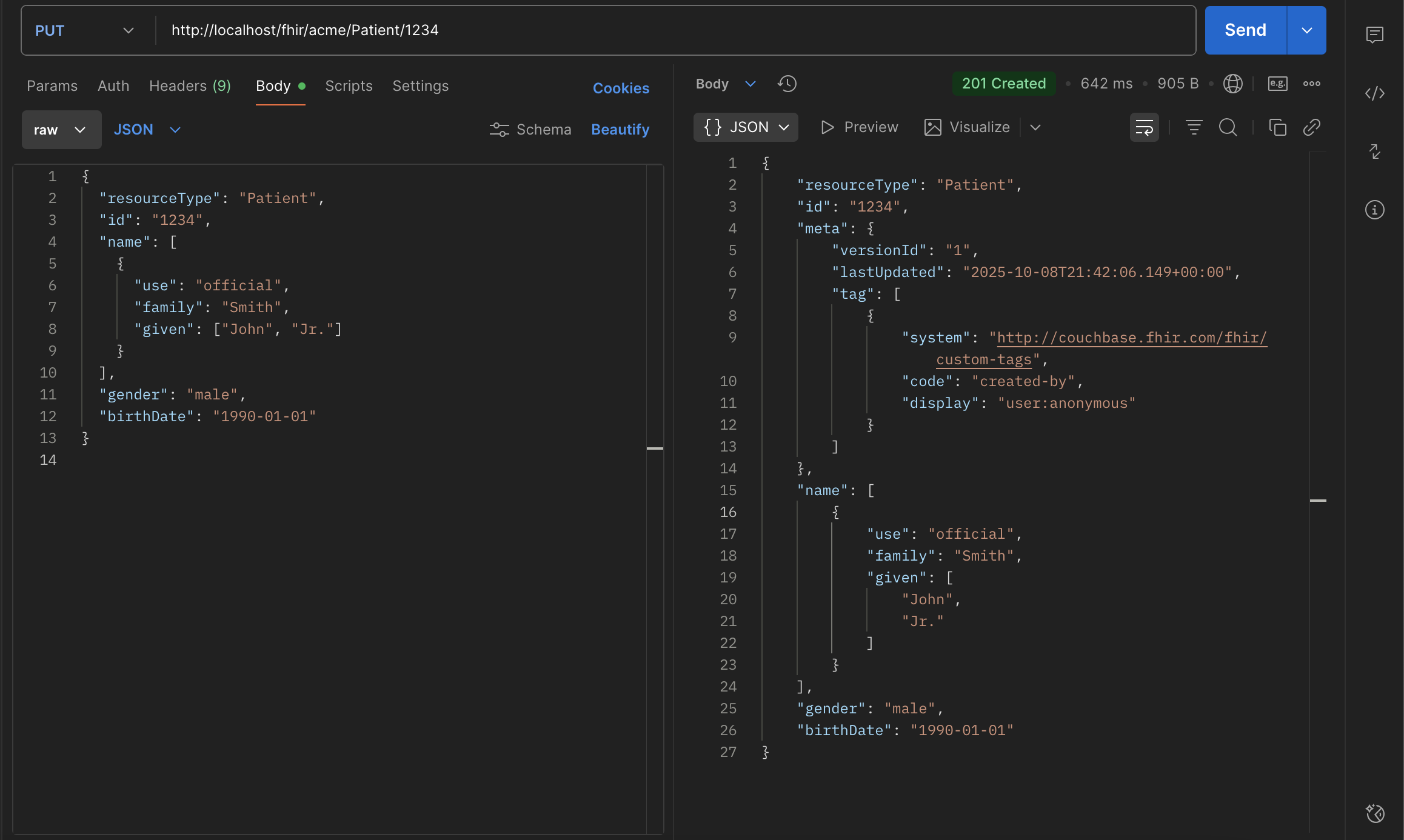
Use PUT to create or replace a resource at a client-chosen ID. Unlike POST (where the server generates the ID), PUT preserves the identifier in the URL.
Endpoint
/fhir/<bucket>/<resourceType>/<id>
Example: http://localhost/fhir/acme/Patient/1234
Key behaviors
ID preservation: The resource is stored with the ID from the URL (1234). If the body includes id, it should match the URL. If omitted, the server sets it to the URL ID.
Create vs Update responses:
- 201 Created — when no existing resource with that ID was present.
- 200 OK — when an existing resource with that ID is replaced.
Response body: Returns the canonical server version of the resource, including an updated meta block. Location header: Points to /fhir/bucket/type/id.
What the server adds/updates (meta)
On every successful PUT, the server manages meta:
- versionId
- "1" if this PUT creates the resource.
- Increments if this PUT updates an existing resource.
- lastUpdated
- Server timestamp when the change was applied.
- tag
- Includes an audit tag:
- created-by for creates
- updated-by for updates
- profile
- Automatically added when the bucket is configured for US Core (or another profile).
Clients should treat meta as server-managed.
Behind the scenes (transactional flow)
Because PUT must preserve the ID and handle versioning correctly, the server wraps the operation in a transaction:
Begin transaction
    Check existence of Patient/1234 in the Patient collection
        If it exists (update):
            Copy the current version of Patient/1234 into the Versions collection
            Increment meta.versionId
            Set audit tag to updated-by
        If it does not exist (create):
            Create a new document at Patient/1234
            Initialize meta.versionId to "1"
            Set audit tag to created-by
            Set meta.lastUpdated to the server timestamp
Commit transaction
This guarantees:
- A full history of prior states (for _history/vread)
- Correct version increments
- Consistent audit trail
Notes & good practices
- Upsert semantics: PUT is idempotent at a given ID—re-sending the same content won’t change the resource beyond lastUpdated semantics.
- Validation: If validation is enabled for the bucket, the payload is validated (FHIR R4 or US Core).
- Strict: rejects invalid content
- Lenient: logs warnings, accepts
- Disabled: skips validation
- Searchability: After commit, the resource is indexed via FTS and immediately searchable (subject to index refresh intervals).
When to use PUT vs POST:
- Use PUT when your client controls the resource’s stable ID.
- Use POST when the server should assign a UUID.