POST — Create a Resource
The POST operation is used to create a new FHIR resource in the target tenant bucket.
You send a FHIR-compliant JSON document to the collection endpoint (for example, /Patient) under your tenant base URL:
http://localhost/fhir/acme/Patient
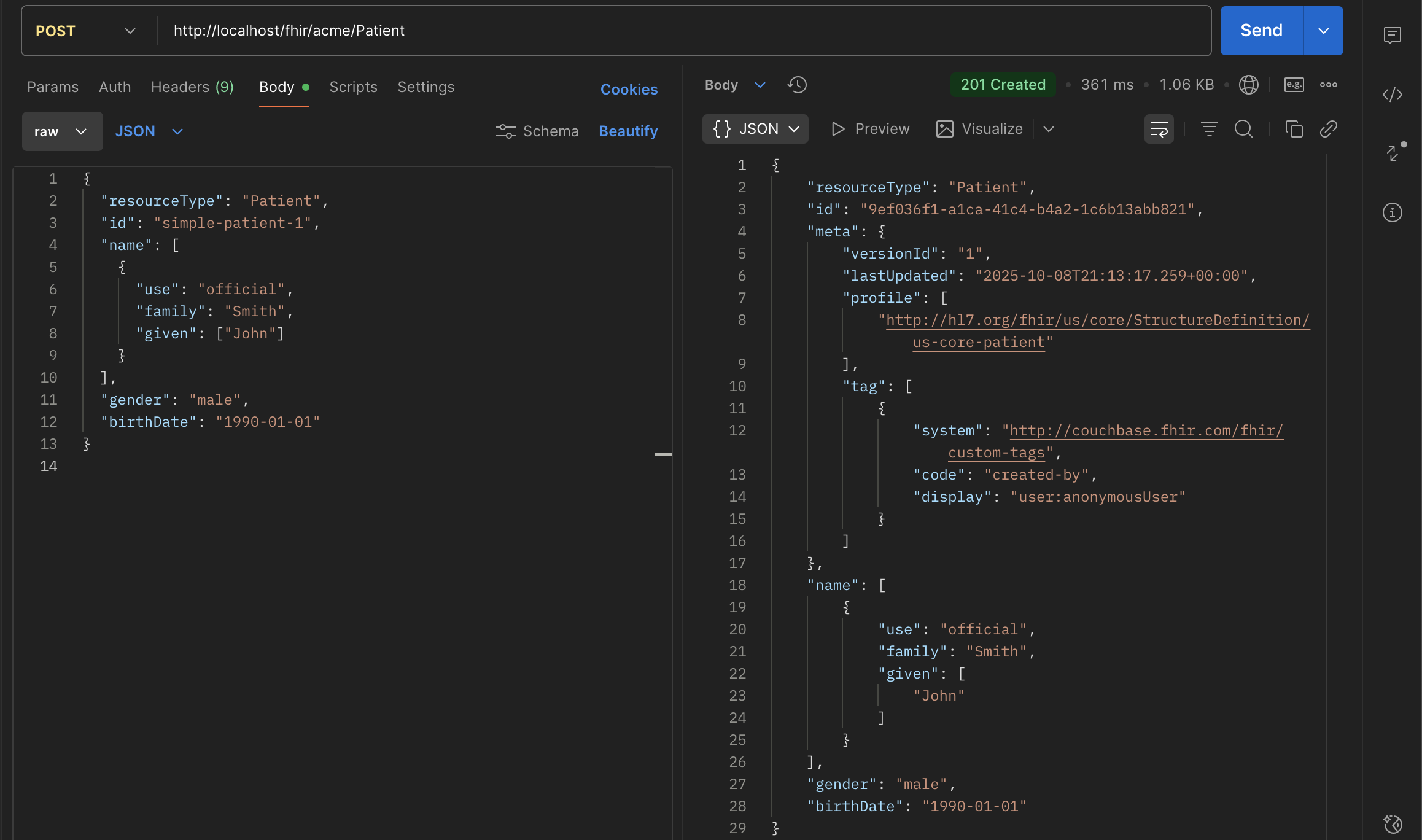
In the example shown, a Patient resource is posted with basic demographic information.
ID Handling
When you perform a POST:
- The FHIR server always generates a new UUID for the resource’s id field.
- If your payload already contains an id, it will be ignored. The server enforces this to ensure all resource identifiers are globally unique and managed consistently.
- The newly created resource is stored in Couchbase under this generated UUID key.
- This behavior aligns with the FHIR R4 RESTful specification, which states that clients should not dictate resource IDs when using POST.
tip
If you need to control the ID explicitly, use a PUT to a specific endpoint (see update section).
Metadata: meta Element
Upon creation, Couchbase FHIR CE automatically populates the resource’s meta section to ensure proper version tracking and provenance:
| Field | Description |
|---|---|
| versionId | Incremented each time the resource changes. Starts at "1" for a new resource. |
| lastUpdated | Server timestamp (ISO 8601) when the resource was created or updated. |
| profile | Added automatically if the bucket is configured with a validation profile (e.g., US Core). Indicates the resource’s compliance with that profile. |
| tag | Custom tags for auditing, typically including creator identity, source, or processing flags. In this example, a created-by tag identifies the user or process that created the resource. |
- The meta element is managed exclusively by the server — clients should not attempt to modify it.
- This metadata ensures the resource is:
- Versioned (for _history and optimistic concurrency)
- Traceable (who created/updated)
- Profile-aware (validated against the configured IG)
Response
HTTP Status: 201 Created
- Response Body: The newly created resource, including server-assigned fields (id, meta, etc.)
- Location Header: Contains the canonical URL of the new resource (e.g., /fhir/acme/Patient/id)
This confirms successful creation and provides the resource URL for future operations.
Notes
- Each POST operation inserts a new resource; it never overwrites existing ones.
- To update an existing resource (keeping its ID), use PUT.
- Soft deletion and versioning are handled automatically; prior versions are stored in the Versions collection.
Validation Behavior
If validation is enabled for the bucket:
- The payload is checked against FHIR R4 or US Core 6.1.0 (depending on configuration).
- Validation errors will:
- Reject the request in Strict mode,
- Log warnings in Lenient mode,
- or be skipped in Disabled mode.
Data Storage
Behind the scenes:
- The resource is stored as JSON in Couchbase (e.g. Resources.Patient collection).
- Indexed via Full Text Search (FTS) for subsequent queries.
- Assigned a unique key (Patient/id), maintaining full traceability and version control.
Summary
- Use POST to create new resources.
- The server generates the ID and meta information.
- The response returns the complete canonical version of the resource.
- Validations, profiles, and audit tags are applied automatically.
- Fully compliant with FHIR R4 RESTful API semantics.